Wodfix Pro
- 4.7
- Rating
- 100.00K
- Installs
- Free
- Price

 Analysis by App-foxy
I approached Wodfix Pro as an entertainment app for people who want a quick way to keep track of classic titles, films currently being shown, and productions that are still on the horizon. That positioning sounds broad, so my first question was not whether it looked busy, but whether it could help me decide what to watch without creating unnecessary friction. My impression is that it is most useful as a discovery companion rather than as a complete replacement for every streaming service or cinema app.
The app comes from Music Radio Official and is free to use. It is aimed at a Teen audience, which is worth remembering if you are choosing entertainment tools for a younger household. Its public reception is encouraging, with a 4.7 average from around 1.7 thousand ratings and more than 100 thousand installs. Those figures suggest that the app has found an audience, although they do not tell me whether its catalogue will match every viewer’s taste or local viewing habits.
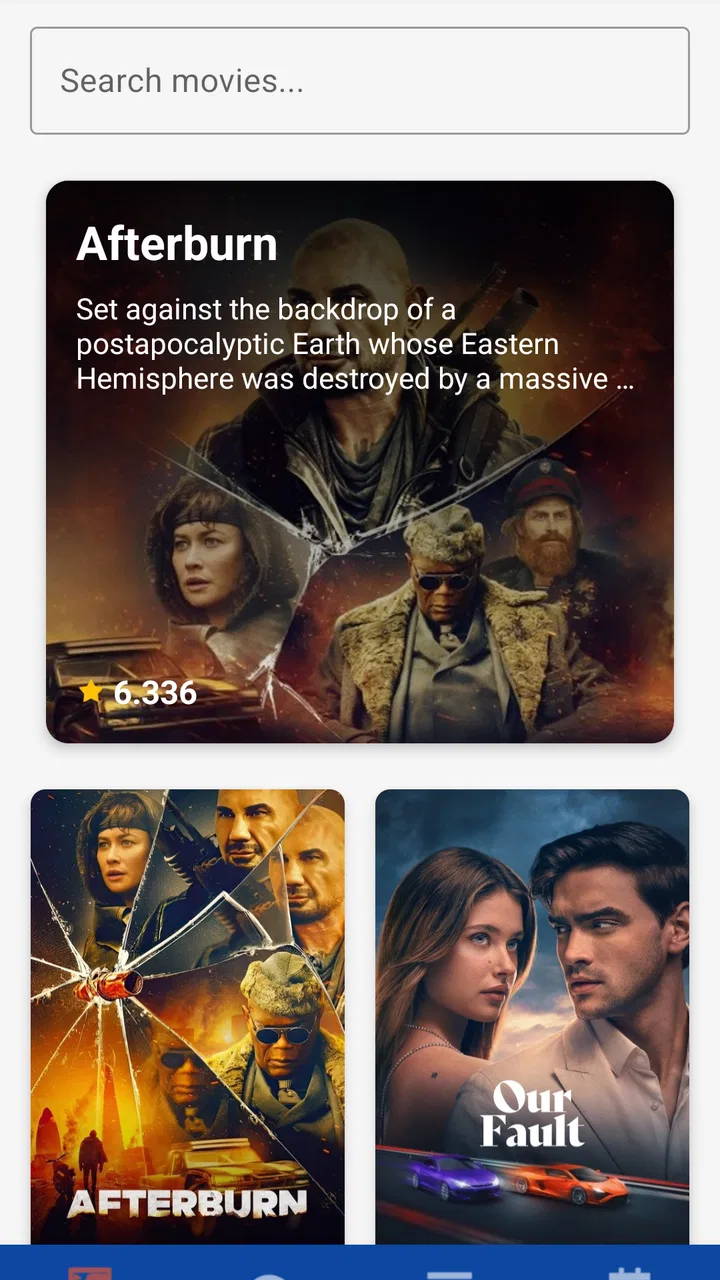
What makes this app interesting is the way it brings three viewing moments together: older material that has already earned its place, titles receiving attention now, and upcoming releases that may become future choices. That combination can be convenient when I am tired of opening several separate services just to answer a simple question: what is worth checking out next?
You May Also Like

 Blood Strike: 2.5 Anniversary
Blood Strike’s Loadouts Turn Every Drop Into a Tactical Gamble
A close look at Blood Strike’s custom loadouts: how fast access to signature weapons reshapes its battle royale rhythm, rewards preparation, and narrows the gap between fights.

 Pandora - Music & Podcasts
Pandora’s Music Is Easy to Start, but Harder to Recover
Pandora’s strength is its low-effort path from a seed to a station. Its weak spot is how much confidence it asks you to place in connection, setup, and quiet recovery.

 8 Ball Pool
8 Ball Pool Is Built on Rivalries, Rematches, and Routine
A close look at the rivalries, rematches, shared routines, and unanswered safety questions that turn a quick pool match into a persistent mobile community.

 Samsung Music
Samsung Music’s Quiet Strength Is Playing What You Already Own
Its reach comes less from spectacle than from dependable access to a personal library. That simplicity is both the app’s strongest retention engine and its ceiling.

 AccuWeather: Weather Radar
AccuWeather Review: A Quick, Clear Forecast for Everyday Decisions
For everyday plans, the best forecast is the one you can understand quickly. AccuWeather makes rain timing, radar, and local conditions easy to act on, with a few trade-offs.

 Hill Climb Racing
Why Hill Climb Racing Still Turns Crashes Into One More Run
A tiny car, a bumpy hill and one more upgrade: Hill Climb Racing keeps resurfacing because its simple chaos makes every near-miss feel personal.
More From Our News Desk
View All News


How I judge the app before trusting it
Entertainment apps often ask for attention more than they ask for money. Even when an app is free, I still want to understand what I am tapping, what information I am entering, and whether I can use it without surrendering control. With this app, I would begin by reading the permission prompts and privacy information shown on the device and in the store before accepting anything. I would not treat a polished catalogue as proof that an app is automatically careful with personal information.
That cautious approach matters especially because Wodfix Pro is designed around browsing. A discovery tool can become part of a daily routine: I may open it while commuting, search for something to watch with family, or save a title mentally for later. The more often an app enters those moments, the more important its visible choices become. I look for clear explanations, understandable settings, and a straightforward way to stop using the service if it no longer suits me.
The app’s current version is 1.1.8, and it supports devices running Android 7.0 or later. That makes it accessible to people who keep an older Android phone rather than upgrading frequently. Still, compatibility is not the same as a guarantee of an identical experience on every device. Display size, system settings, connection quality, and the way the app handles content loading can all affect how comfortable browsing feels.
I also appreciate that the app is free because it lowers the barrier to trying it. At the same time, free entertainment products deserve a closer look at the points where they may request sign-in details, show promotional material, or encourage additional actions. I would make those decisions deliberately instead of tapping through screens simply to reach the catalogue.
What the three-part catalogue means in practice
The classic section is potentially the most useful part for viewers who do not want their choices limited to whatever is being promoted this week. Older films and shows can be easier to overlook when a service focuses heavily on new arrivals. I like the idea of having a place to revisit familiar work or discover titles that friends mention but that do not appear prominently in current-release lists.
The currently screening area serves a different purpose. It is more relevant when I am deciding whether to watch something that is receiving attention right now, perhaps before discussing it with colleagues or choosing a cinema outing. I would use this section as a starting point, then check the actual availability through the relevant cinema, broadcaster, or streaming provider rather than assuming that appearing in the app means I can play the title there.
The upcoming area is useful for planning, but it also requires restraint. Future listings can help me notice a release I want to remember, yet they are not a promise that the title will arrive on a particular service in my region. Release plans can change, and availability can differ by country. This is one of the most important trade-offs in a broad entertainment guide: it can improve awareness without being the final authority on where or when I can watch something.
A practical workflow is to use the app in three passes. First, I browse upcoming material and note only the titles that genuinely interest me. Next, I use the classic area when I want a dependable backup choice rather than chasing every new release. Finally, I check the current section when I am ready to make a near-term viewing decision. This prevents the upcoming catalogue from becoming a long, unmanageable wish list.
Where trust depends on what the screen lets me control
My preferred entertainment apps make user choices visible. I want to know whether I can browse without creating an account, whether a sign-in is optional or required, and whether any saved preferences can be removed. I would inspect those points directly on my device because they affect how much personal information I choose to share. I would also check the operating system’s permission manager after installation, rather than relying only on the initial prompt.
This is not a criticism of Wodfix Pro specifically; it is a sensible habit for any free catalogue app. A user should be able to decide whether to grant an optional permission, decline it when it is not needed for the task, and revisit that decision later. If a prompt is vague, I would postpone the decision and look for an explanation in the app’s settings or privacy documentation.
Account controls matter in a similar way. If I create an account, I want to understand how to sign out, change credentials, and remove the account if I stop using the app. I would avoid entering information that is not necessary for browsing. For a simple entertainment search, my default preference is to provide as little personal information as the app reasonably allows.
Another useful check is notification control. Upcoming releases can make alerts tempting, but I do not want every discovery tool competing for my attention. I would start with notifications disabled or limited, then enable only the type that provides real value. If the app offers separate controls for recommendations, release reminders, or promotional messages, I would keep those categories distinct rather than accepting one broad switch.
The moments when I would be most careful with data
The first sensitive moment is installation. I would read each permission request and ask whether it makes sense for an app whose main purpose is entertainment discovery. I would not grant access simply because the app asks for it. Android’s permission settings give me a useful second chance to review or revoke access, and I would use them if the request felt broader than the task required.
The second moment is searching. Search terms can reveal more than a viewer may realize, especially when they concern personal interests, family topics, or sensitive subjects. I would avoid typing private details into a general entertainment search field. If I were looking for a title connected to a personal situation, I would use a neutral phrase and avoid combining it with identifying information.
The third moment is following a title or interacting with recommendations. Any feature that remembers choices can be convenient, but it also creates a record of preferences. I would periodically review saved items and remove old entries that no longer matter. This is a small habit, yet it keeps a watchlist from becoming a permanent archive of every passing interest.
The fourth moment is leaving feedback. Since the app has received hundreds of reviews, public comments are clearly part of its wider user experience. I would keep feedback focused on the product and avoid including my email address, location, phone number, or other personal details in a review. A useful review can describe a loading problem or confusing screen without exposing information that belongs only to me.
These habits do not make the app difficult to use. They simply separate browsing from unnecessary disclosure. For me, that distinction is central to deciding whether a free entertainment tool deserves a regular place on my phone.
A realistic evening with the app
Imagine that I have twenty minutes before meeting friends and nobody agrees on what to watch later. I would open the app and begin with the currently screening material to see what is attracting attention. If nothing fits the group, I would move to the classic selection and look for a familiar genre or a title that works for a mixed audience. I would then glance at upcoming entries only if we wanted something to anticipate rather than something to play that night.
That workflow is better than endlessly scrolling through a streaming service because it starts with the decision itself: now, familiar, or later. It also keeps expectations realistic. After finding a promising title, I would still verify where it is actually available and whether it suits the group’s age range. The app can narrow the search, but I would not expect it to settle every practical detail of the viewing plan.
For a solo viewer, I would use the app differently. I might browse classics when I want something dependable, then use current listings when I feel like joining a wider conversation. For a parent or guardian, the Teen content rating means I would still make my own judgement about individual titles. A general age label is useful context, not a substitute for checking whether a particular film or show is appropriate for the people watching.
For someone who follows releases closely, the upcoming section may become the main attraction. The trade-off is that planning can turn into collecting. I recommend keeping a short personal list and removing titles that no longer interest you. That makes the app a decision aid instead of another source of digital clutter.
How it compares with familiar alternatives
Compared with a streaming service, Wodfix Pro appears better suited to discovery across viewing periods than to playing content in one place. A streaming service usually wins when I already know the title and want to watch it immediately. This app is more useful when I do not know what I want, when I want to revisit older material, or when I want to keep an eye on future releases.
Compared with a cinema-focused app, its broader mix is an advantage for home viewing and older favourites. A cinema app may be more practical for local showtimes, ticket decisions, seating, and venue details. I would choose that kind of alternative when the immediate goal is going out to a screening, not exploring the wider entertainment landscape.
Compared with a social recommendation platform, Wodfix Pro may appeal to people who prefer browsing titles without making the experience revolve around conversation. Social apps can be stronger when I want personal recommendations from friends or a lively discussion. Their weakness is that popularity can dominate discovery. A catalogue organized around classic, current, and upcoming material gives me a calmer way to explore, provided I am willing to verify the final viewing option elsewhere.
Compared with a simple notes app, this app offers a more focused environment for entertainment discovery. A notes app gives me complete control over my own lists and requires little personal context, but it cannot replace a dedicated catalogue for finding new possibilities. My choice would depend on whether I need discovery or only want to record titles I already know.
Who will benefit and who should skip it
I would recommend trying the app if you regularly ask friends for viewing suggestions, enjoy mixing older favourites with new releases, or want one browsing routine that covers what has already arrived and what may be coming next. It is also a reasonable option for people using older Android hardware, since the minimum operating system is Android 7.0.
I would be less enthusiastic if your only goal is instant playback. In that situation, opening the relevant streaming or cinema service directly is likely to be faster. I would also skip it if you dislike catalogue browsing, do not want to review permissions and account choices, or expect every listed title to be available in your country at the moment you see it.
People who need detailed local scheduling should treat this app as a companion rather than a replacement for a cinema’s own tools. Likewise, viewers who want highly personalized recommendations may prefer a service built around their viewing history, while users who value privacy above convenience may choose to browse without signing in and keep their own offline notes.
My cautious verdict after using it
Wodfix Pro has a clear practical idea: make classic, current, and upcoming entertainment easier to consider in one place. I like that the concept supports different moods instead of forcing every visit toward the newest release. The free price makes experimentation easy, and the solid 4.7 average from around 1.7 thousand ratings gives it a reassuring starting point for curious users.
My recommendation comes with boundaries. I would use it for discovery, planning, and broadening my choices, but I would verify availability through the service that actually provides the title. I would also review permissions, limit notifications, avoid unnecessary account details, and clean up saved choices regularly. Those steps are not burdensome, and they give me more control over the experience.
The developer, Music Radio Official, has published an app that is most convincing when it acts as a thoughtful guide rather than pretending to be the entire entertainment ecosystem. If you want a single place to explore older material, see what is drawing attention now, and notice what may arrive later, it is worth trying. If you need guaranteed playback, precise local cinema information, or a completely private experience with no account decisions to consider, a more specialized alternative will probably serve you better.
My final view is cautiously positive: use it as a discovery layer, keep your personal choices deliberate, and confirm the practical details before you commit to watching anything. That approach matches what the app does best while avoiding the expectations that could make it feel less useful than it really is.
FAQs for Wodfix Pro
01What is Wodfix Pro and what can I use it for?
Wodfix Pro is an entertainment-focused application designed to give users access to video content through a mobile-friendly interface. After testing the app, its main appeal is the convenience of browsing available titles, checking basic information, and starting playback from one place. The exact catalog and available features may vary depending on your region, app version, and the service’s current availability.
02Is Wodfix Pro free to download and use?
The application may be available to download without an upfront charge, but that does not necessarily mean every feature or piece of content is free. Some services use advertising, optional subscriptions, account-based access, or other restrictions. Before using Wodfix Pro extensively, review the information shown on its official download page and inside the app so you understand possible costs, limitations, and payment conditions.
03Is Wodfix Pro safe for Android and iOS devices?
Safety depends largely on where you obtain Wodfix Pro. Installing it through an official app store is generally preferable because the package is subject to platform checks and can receive verified updates. Avoid unofficial APK files, modified versions, or download links requesting unusual permissions. During testing, users should also review requested access, privacy details, developer information, and device security warnings before signing in or entering personal data.
04Does Wodfix Pro require an account or an internet connection?
Many of the app’s functions are intended for online use, particularly browsing updated content and streaming or loading media, so a stable internet connection is normally recommended. Whether registration is required can depend on the version and the content being accessed. If the app offers account creation, use a strong, unique password and check whether it supports guest browsing, offline viewing, multiple devices, or synchronization between platforms.
05What should I do if Wodfix Pro does not work properly?
If Wodfix Pro crashes, fails to load content, or displays playback problems, first check your internet connection and confirm that the application is updated. Closing and reopening the app, restarting the device, and clearing temporary cache data can also help. If the issue continues, review the app’s support information and compatibility requirements. Do not install unofficial fixes, since modified packages may create security and privacy risks.
Pros
- Clean interface makes browsing categories and titles straightforward.
- Search tools help locate specific movies and series quickly.
- Supports convenient streaming from a mobile device.
- Regular content updates can keep the catalog feeling fresh.
- Simple navigation is suitable for users with limited technical experience.
Cons
- Content availability may vary by region or change without notice.
- Streaming quality depends heavily on your internet connection.
- Some features may require permissions that privacy-conscious users dislike.
- The app may use considerable mobile data during extended viewing.
- Compatibility can vary across older Android and iOS devices.

Wodfix Pro
Gallery